Fuelly Mobile Update
February 17, 2011 1:12 PM   RSS feed for this thread Subscribe

Today we updated the look and feel of Fuelly Mobile.

The new Fuelly Mobile was built with jQuery Mobile and it should provide a more native-app feel on the iPhone, Android, and BlackBerry. (If you're interested in the details, you can see a chart with the various devices/OS versions that jQuery Mobile serves here: Mobile Browser Support.)

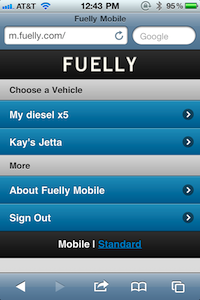
Here's what the front page of Fuelly Mobile looks like on the iPhone once you're logged in:


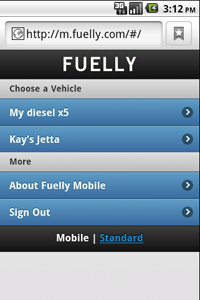
And here's the same screen on an Android:


The biggest change is that everything is sized a little better for your fingers. Let us know how it works for you and if have problems with the new site. Thanks!
posted by pb to Fuelly Site Issues at 1:12 PM (24 comments total)
TIGwelder
Feb 19, 2011
12:39 AM

The entry boxes and font size are way too small now.

The first fill up with the new interface defaulted to a partial fill up which I know I didn't choose. I had to go in and edit the fill up through the full site to get an MPG for the fill.

I've always had a problem with the date being incorrect when I'm filling up at 2am my time (EST). I have to change that every time I add a fill up since it's always after midnight by a few hours.


pb
Feb 19, 2011
6:33 AM

What mobile device are you using?

TIGwelder
Feb 19, 2011
9:47 AM

Iphone 3G


pb
Feb 19, 2011
10:10 AM

ok, yeah, the font size for text entry is slightly smaller on the iPhone. Maybe we can bump that up, but I don't think it's that much smaller. If you'd like to compare the old and the new, try out m2.fuelly.com which has the old version running temporarily while we transition.

I'm not sure why partial would have been pre-selected. I can't reproduce it here. You might give it another couple fuel-ups and see if you get that behavior consistently.

And yeah, we base the current data on our server time which is in the Pacific time zone. We should use the time offset set in your profile instead. I'll add that to our to do list.

MattJackson86
Feb 19, 2011
4:08 PM

New version does not seem to work at all on my BB Tour. The main page buttons don't do anything when clicked on.


pb
Feb 19, 2011
7:41 PM

Are you using the native browser on your Blackberry Tour or Opera? If it's Opera, which version?


pb
Feb 19, 2011
7:47 PM

Oh, another quick question: do you have JavaScript enabled for whichever BB browser you're using? In the BB browser I believe it's at Menu->Options->Browser Configuration, then make sure "Support Javascript" is checked.

ajv915
Mar 1, 2011
5:51 AM

pb,
I have JS enabled on my BB curve, but it still will not let me select my vehicle to enter the fill up info. I think I am having the same issue as Matt.


pb
Mar 1, 2011
10:17 AM

What version of the BlackBerry OS do you have? Here's a list by model. Fuelly Mobile should work with OS 5+.

rbeitz
Mar 3, 2011
11:52 AM

The app is not working very well on my blackberry curve 8310. It takes forever to load the app and even after I select my car and input the data it takes 1-2 minutes to update. Also the screen is rather plain now and does not look anything like the above screen shots for iphone or android.
I liked the old version much better


pb
Mar 3, 2011
1:41 PM

Yeah, sorry rbeitz, it's not going to work as well with older BBs. Your curve 8310 has BlackBerry OS 4.5.0. You might try adding fuel-ups via SMS instead.

ajv915
Mar 4, 2011
11:31 AM

I have v5.0.0.973. Just does not recognize my clicking on that screen. On any of the available options.


pb
Mar 4, 2011
12:49 PM

ok, let me know what model of curve you have ajv915. I'll install the emulator for it and see if I can duplicate the problem.

Don65Stang
Mar 9, 2011
9:22 AM

The new app doesn't work on BB Bold 9700, OS 5.0.0.
"Support Javascript" is checked on my BB.


pb
Mar 9, 2011
10:24 AM

Thanks for letting me know your model Don65Stang. I got the BB Bold 9700 emulator with OS 5.0.0.979. When I bring up Fuelly Mobile, I see the links as standard web links. Here's a screenshot:

bb screenshot

Granted, it doesn't look as pretty as the screenshots above. But the links work fine. Is this what you see on your phone?


pb
Mar 9, 2011
2:00 PM

ok, spent some time with the emulator and created some styling for BlackBerry models that don't get the jQuery Mobile treatment. Here's how the page should look on the Bold 9700 now:

bb screenshot

folgerwan
Mar 10, 2011
9:12 AM

Hello Fuelly Folks,

I'm not having any luck. I'm on a BlackBerry Bold (9650) (v5.0.0.732) and m.fuelly.com site comes up blank/white in the blackberry browser. The support javascript check is on.

Let me know if I can provide any other details.

m2.fuelly.com works like a good thing, so I can still use that.

Thanks,

John


pb
Mar 10, 2011
10:05 AM

Does the site work, folgerwan? Can you click links? Can you add a fuel-up?

folgerwan
Mar 10, 2011
11:59 AM

PB,

No, it does not work. When I head to m.fuelly.com, the blackberry browser window goes white and a page appears to be loading, indicated by a status bar at the bottom of the screen. After the "Loading Data..." status is complete at 185k, the browser window appears completely white without any icons/text/buttons. The page title (Fuelly Mobile) is listed at the top of the screen, but there's nothing to click on or fields to enter.

Let me know if there are more details I can provide.


pb
Mar 10, 2011
12:00 PM

Thanks for adding more details, folgerwan. The more details we get the more help it is on our end. I'll download the emulator for your BB model/OS tomorrow and take a look.


pb
Mar 11, 2011
5:07 PM

I can't duplicate that on this end, folgerwan. The BlackBerry Bold 9650 emulator is working just fine for me. The closest OS I could get on the developer site was 5.0.0.621, so it's not exact. Here's a screenshot:

bb screenshot

So I'm not sure it's related to your model. It might have something to do with your particular setup. Can you update your browser or OS? I don't have a BlackBerry so I'm not sure how complicated that is.

folgerwan
Mar 14, 2011
5:50 AM

Tried it again after a power down/battery pull (a standard BB technique), and no luck. I have to check with my IT guy to see if I can try to update the standard browser or OS.

As another alternative, I downloaded an alternative browser - Opera Mini 5.1 - and it worked on that platform.

Thanks for the help here, PB!

drrck
Mar 15, 2011
5:51 AM

I see the JS page, but clicking on things is very slow on my BB Tour. Is the prior version still available? It works fine in Opera Mini, but isn't very usable in the native browser.


pb
Apr 1, 2011
12:09 PM

We just updated the mobile site to use jQuery Mobile Alpha 4. This update adds support for Windows Phone 7. No changes on the Blackberry front, but they say they're focusing there next: "...will be focusing on increasing our device support to include Blackberry 5 and Symbian S60..."

So things should be getting better for BB 5 folks down the road.

« Older Feully API   |   First fill ignored in ODO mode... Newer »

You are not logged in, either login or create an account to post comments